StealC Is Back, and This Time It's a RAT
Four months after Operation Endgame took it down, StealC's seller returns with Stadia, a remote access trojan that shares StealC's code byte for byte.


Key Takeaways
In June, Europol tore down StealC, a prominent infostealer, as part of Operation Endgame. International authorities seized 326 servers and 142 domains, recovered more than 25 million stolen credentials from 385,000 infected machines, and pulled the plug on one of the most widely sold infostealers of the last three years.
Four months later, on October 16, the seller behind StealC resurfaced with Stadia. This time it's not a stealer: it's a full remote access trojan. The RAT’s features include hidden desktop control, a live command shell, a file explorer, a process manager and an in-memory loader, with StealC's stealer welded on as one module among six. The actor behind Stadia is working hard to win back original StealC customers: every former StealC customer is offered a free month on the top ($900) tier.
Varonis Threat Labs obtained the build shortly after it was listed, reversed it, and watched its panel operate against a machine of our own. The code inside it is StealC's.
Operation Endgame forced the seller to rebuild its infrastructure and start again with a new name, new servers and a new panel. This blog walks through that rebuild from the inside: the listing, the panel running against a host of our own, the agent's code, and the detections that catch it.
The listing
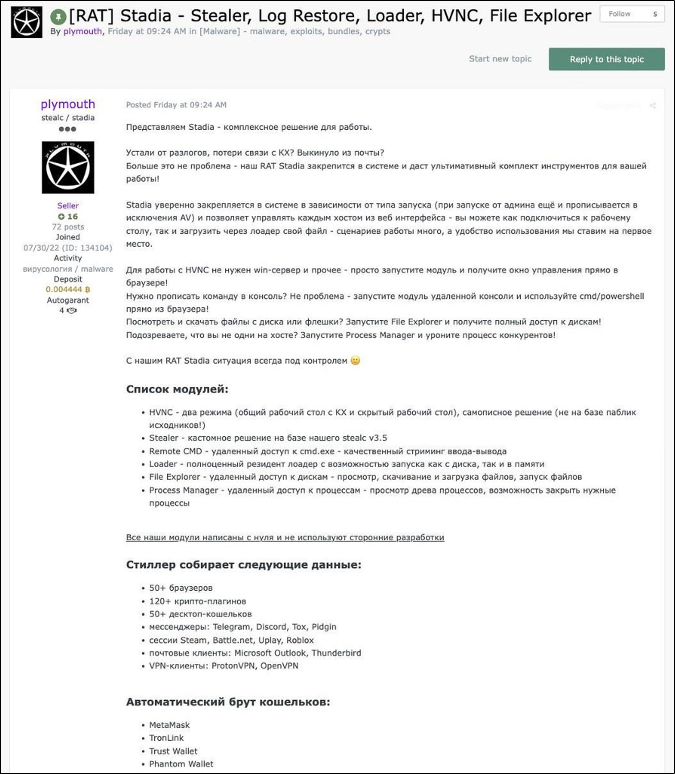
The listing is titled [RAT] Stadia - Stealer, Log Restore, Loader, HVNC, File Explorer (HVNC is Hidden Virtual Network Computing, remote desktop control the victim cannot see), and the seller pitches it as an agent that embeds itself in the system and hands the operator a full toolkit from a web panel.
The module list reads like a remote administration suite rather than a stealer:
The stealer collects from 50+ browsers, 120+ crypto plugins, 50+ desktop wallets, messengers (Telegram, Discord, Tox, Pidgin), Steam, Battle.net, Uplay and Roblox sessions, Outlook and Thunderbird, and ProtonVPN and OpenVPN clients. A wallet brute covers MetaMask, TronLink, Trust, Phantom, Rabby, OKX and others.
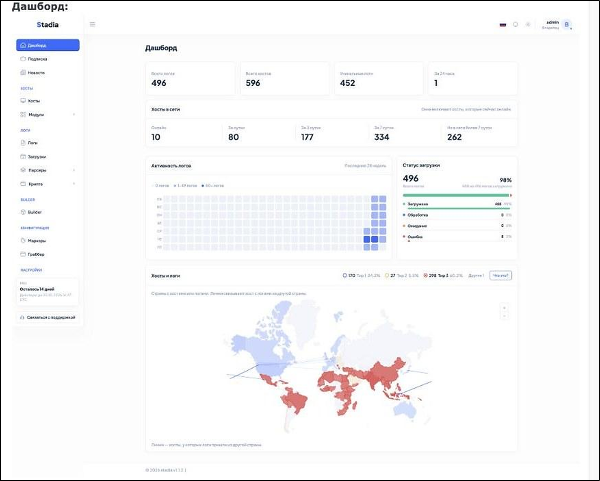
The seller's own screenshots in the listing show the product in use. Their demo dashboard reports 596 hosts and 496 logs, with a world map of infections concentrated in South and Southeast Asia, Africa and Latin America.
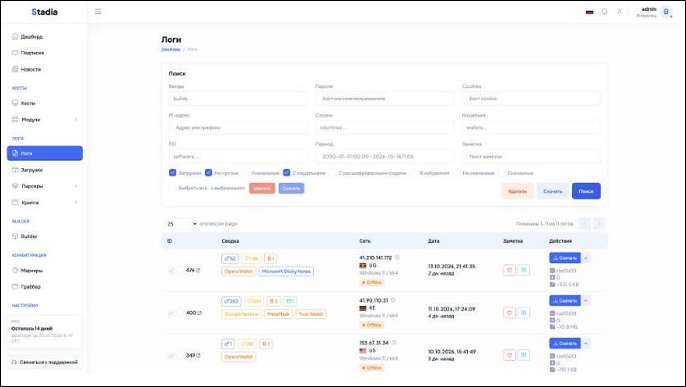
The logs view carries the StealC heritage on its face: per-victim rows with wallet and extension tags, country, OS and a download button for the archive.
The HVNC screenshot is a live remote-desktop session on an infected Windows 11 machine, with a Spanish-language runtime error dialog sitting on the victim's desktop. The seller's toolbar offers Ctrl+Alt+Del, Win+R, quality settings and a full-screen mode.

Pricing and the StealC pipeline
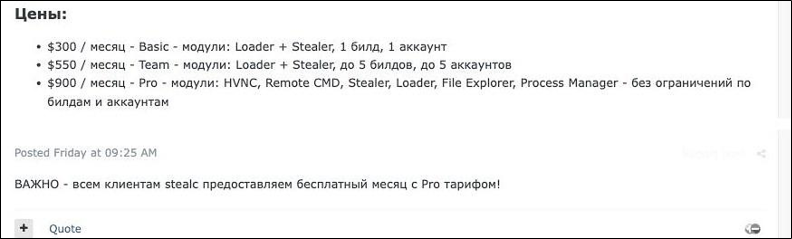
Stadia sells on a monthly subscription, tiered by how many modules and builds you get.
A second post, added a minute after the listing, offers every StealC customer a free month on the Pro tier. Customers whose panels and servers went down in June get the fuller toolkit at no cost, and the seller keeps the install base.
Inside the panel
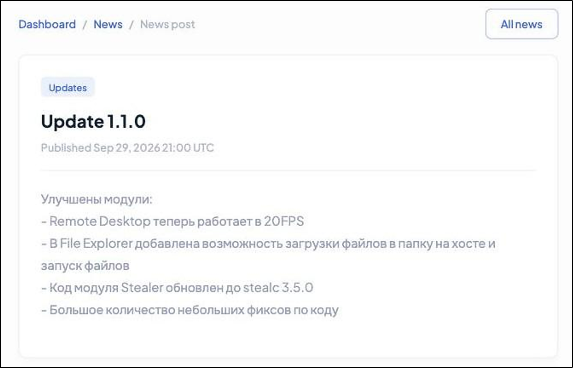
Buyers run everything from a web panel. It brands itself Stadia and runs at version 1.1.2, matching the agent version baked into the sample. Its news tab is a short changelog. Update 1.0.0 (10 Sep 2026) is the first beta release. Update 1.1.0 (29 Sep 2026) records the Stealer module code updated to stealc 3.5.0.
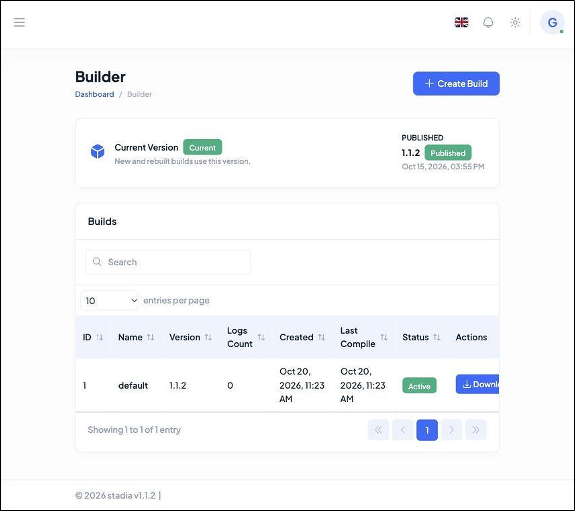
The builder tab compiles agents from the current published version. Operators create a build, download the .exe, and deploy it. Our sample is one such build.
The sidebar organizes stolen data by type: passwords, credit cards, messengers, software, session tokens for Chrome, Discord, Steam, Roblox, and Azure, and a crypto section for seed phrases.

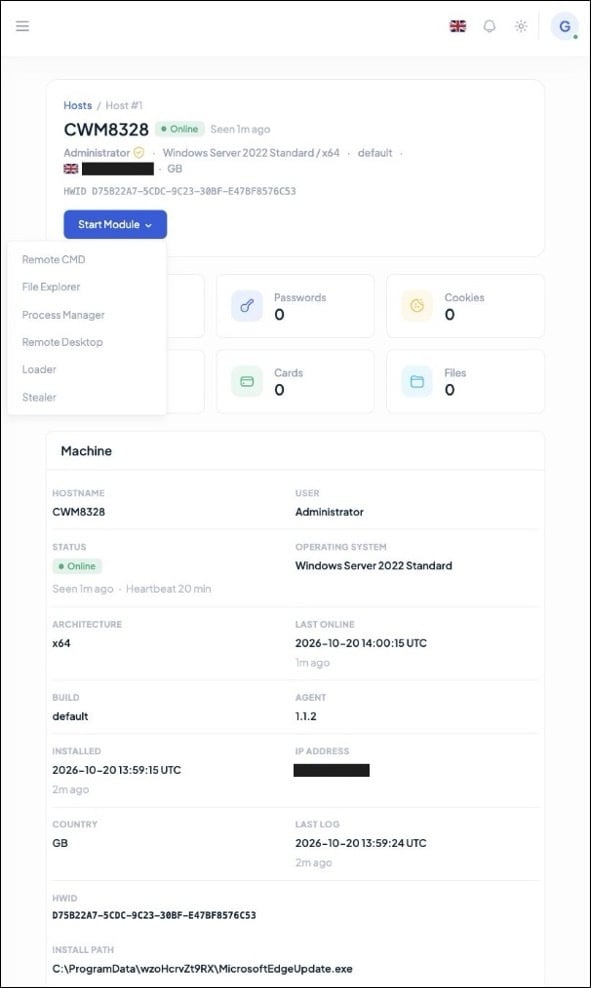
To see the agent and panel as a pair, we stood up one disposable Windows host of our own and let it register. It appeared in the panel's host inventory within a minute, tagged online.
The host overview is a full remote-administration console: live status and heartbeat, the install path under C:\ProgramData\, counters for passwords, cookies, wallets, cards and files, related tasks and logs, and a Start Module menu offering Remote CMD, File Explorer, Process Manager, Remote Desktop, Loader and Stealer.
Starting a module opens a confirmation dialog first. Remote Desktop offers a current-desktop or isolated virtual-desktop session.
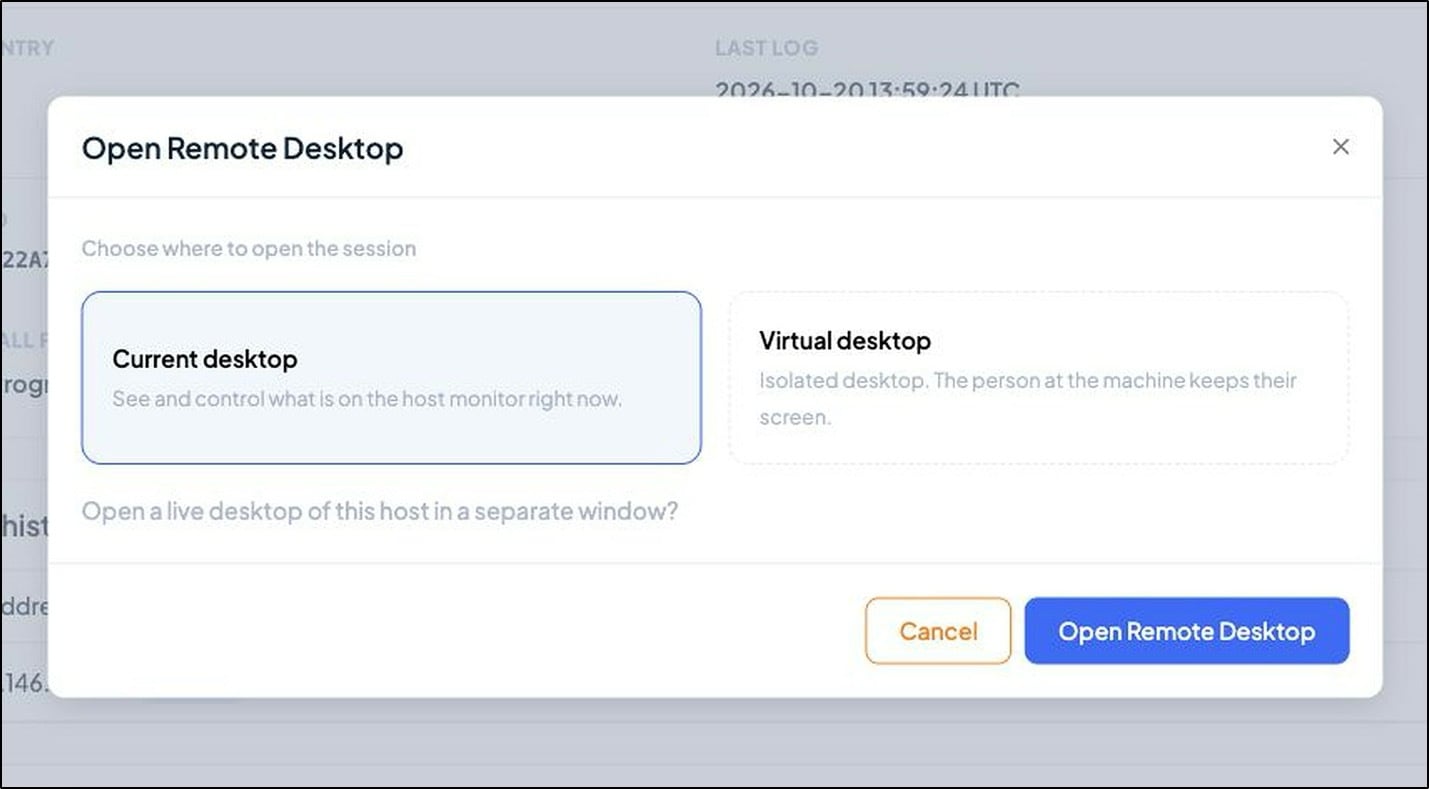
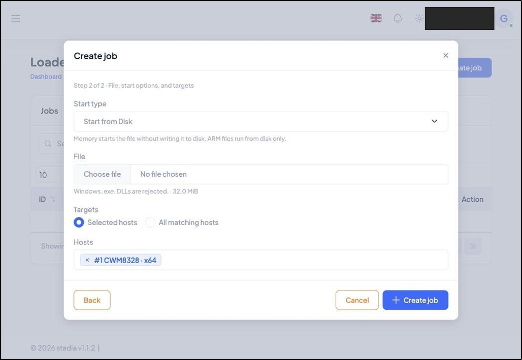
The Loader accepts EXE, PowerShell, CMD and MSI, with disk or in-memory execution for each. A job targets selected hosts or every matching host.
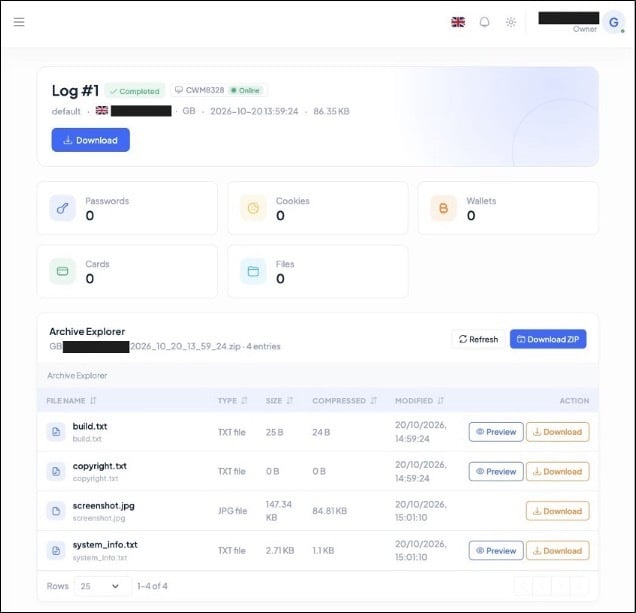
The log it produced for our host carried a system profile, a desktop screenshot and build metadata, with zero credentials because the host was clean. The archive layout (build.txt, copyright.txt, screenshot.jpg, system_info.txt) is the StealC log format.
What the binary is
The sample we pulled from that builder is a 560,128-byte 32-bit Windows executable, native Microsoft Visual C++ (MSVC), no .NET, no Authenticode signature. It decrypts its own build marker to STADIA_BETA and reports agent version 1.1.2, so the file and the panel agree on what it is.
There is no packer. The outer file imports only KERNEL32.dll and resolves nearly every operational application programming interface (API) at runtime, so the static picture stays thin until you decrypt the strings.
The string scheme
Almost every meaningful literal (module names, command-and-control (C2) fields, the config) is stored under one scheme:
stored literal = Base64(RC4(plaintext, "eepkTOgSwdNCgrhITR"))
The outer Rivest Cipher 4 (RC4) key sits at file offset 0x6B1A0. Recovering the table is a few lines of Python once you have the key: Base64-decode each candidate, RC4 it with the key, keep anything that comes out printable.
def rc4(data, key):
s = list(range(256))
j = 0
for i in range(256):
j = (j + s[i] + key[i % len(key)]) & 0xFF
s[i], s[j] = s[j], s[i]
i = j = 0
out = bytearray()
for b in data:
i = (i + 1) & 0xFF
j = (j + s[i]) & 0xFF
s[i], s[j] = s[j], s[i]
out.append(b ^ s[(s[i] + s[j]) & 0xFF])
return bytes(out)
# stored = Base64(RC4(plaintext, key)); recover with:
# plaintext = rc4(base64.b64decode(stored), b"eepkTOgSwdNCgrhITR")
That pass returns 542 strings: the command vocabulary, the browser targets, the scheduled-task template and the C2 config. The message key and access token were recovered but are omitted from this write-up.
Startup and the locale gate
Entry is ordinary MSVC startup into a WinMain-like routine. Early on, the agent calls GetUserDefaultLangID and exits for Russian, Ukrainian, Belarusian, Kazakh, and Uzbek system languages (0x0419, 0x0422, 0x0423, 0x043F, 0x0443), the standard do-not-run-at-home guard. It then checks whether its own path sits under C:\ProgramData\. If not, it installs; if so, it takes a single-instance mutex Local\<username>.<computername> and enters the agent loop.
That branch is why our one dynamic run went nowhere. Launched under a Low-integrity token from outside ProgramData, the sample took the installer path, could not create its directory, and exited silently. That result reflects our lab setup and says nothing about whether the sample works.
How it talks to the server
Once installed, the agent calls home. The config carries three hard-coded C2 bases, all plain HTTP on the root path:
http://93.152.213.215/
http://91.92.43.45/
http://193.148.56.97/
The agent tries its three C2 addresses in a fixed order, starting with the first every time it reconnects. To test each one, it sends a set_online message with a host_token of 72 zeroes and waits up to eight seconds for any reply that contains an opcode. If none of the three answers, it waits 300 seconds and starts again.
The traffic is not what its header claims. Each message starts as JSON, is encrypted with RC4 using the embedded message key, and is then Base64-encoded before being sent as the HTTP body. The request still declares Content-Type: application/json, so anything inspecting the header expects JSON and receives ciphertext.
Persistence, modules and injection
Installation drops the agent under a randomized 12-character directory below C:\ProgramData\ and picks a filename from a fixed list of nine that impersonate legitimate updaters:
- RuntimeBroker.exe
- SecurityHealthHost.exe
- SearchHost.exe
- TextInputHost.exe
- MicrosoftEdgeUpdate.exe
- GoogleUpdate.exe
- OneDriveStandaloneUpdater.exe
- nvcontainer.exe
- AdobeARM.exe.
The scheduled task name is selected separately from the same nine names, so the task label and the executable need not match. The task is hidden, runs at logon and every 15 minutes for 3,650 days. When the agent is elevated, it also issues a hidden PowerShell Add-MpPreference -ExclusionPath for its install directory. Our test host confirms the scheme: it installed to C:\ProgramData\wzoHcrvZt9RX\MicrosoftEdgeUpdate.exe, a 12-character directory and one of the nine names.
The decrypted module vocabulary matches the panel one-to-one:
The StealC fingerprint
The seller says the stealer is built on StealC 3.5. The binary proves the two share code at the byte level.
Inside stadia_x32.exe, at file offset 0x77D48, sits a complete 26,112-byte (0x6600) 64-bit Chromium App-Bound Encryption helper, a mapped portable executable (PE) plus a short reflective loader. That exact blob appears once in each of the StealC v3.5 x86 and x64 builds we hold, byte for byte:
Detection and hunting
Stadia's C2 addresses, RC4 key and access token change with every build. What stays the same is how the agent talks to its server and what it does on the host, and that is where detection should focus.
On the network, the agent sends HTTP POST requests to the root path of a bare IP address. The Content-Type header claims the body is JSON, but the body is Base64-encoded ciphertext. That mismatch is a useful signal on its own. The build we analyzed calls 93.152.213.215, 91.92.43.45 and 193.148.56.97 on port 80, and blocking those addresses covers that build only.
On the host, the clearest signal is the browser credential theft. An unsigned process running from C:\ProgramData\ starts a genuine Chrome, Edge or Brave process in a suspended state and writes a 26 KB block of code into it. Moments later, a .txt file with a GUID-style name appears in C:\ProgramData\, holds a 64-character hex string, and is deleted. That file carries the key the browser uses to protect saved cookies and passwords.
Persistence leaves its own trail. Within a few minutes of infection, look for a new executable in a random folder under C:\ProgramData\, a hidden scheduled task that repeats every 15 minutes, and a Windows Defender exclusion added for that folder through PowerShell's Add-MpPreference command. This Sigma rule flags the scheduled task:
title: Hidden Fifteen Minute Scheduled Task Executes From ProgramData
status: experimental
logsource:
product: windows
service: security
detection:
selection_event:
EventID: [4698, 4702]
selection_xml:
TaskContent|contains|all:
- '<Interval>PT15M</Interval>'
- '<Duration>P3650D</Duration>'
- '<Hidden>true</Hidden>'
- 'C:\ProgramData\'
condition: selection_event and selection_xml
level: high
The implant registers the task through the Component Object Model (COM) API, so a rule scoped to schtasks.exe would miss it. Start the behavioral rules in alert mode and tune them against your own telemetry before you block on them.
Where this leaves things
Stadia is the StealC operation rebuilding after Operation Endgame. The servers, domains and stolen data are gone, and the response has been to come back under a new name with a broader product and a free month to pull former customers across. The stealer is still there, now as one module in a remote access trojan that adds hidden VNC, a command shell, a file explorer, a process manager and in-memory loading.
StealC took credentials and left. Stadia stays, watches the screen, runs commands, moves files and loads whatever comes next, and it is priced for teams rather than individuals. A disrupted stealer has come back as a platform, and the four-month turnaround shows how quickly a seller with an existing customer base can rebuild once the code survives the takedown.
Indicators of compromise