Data Security Platform
Clear Windows and Unix data source types
Data source types in the Varonis Web Interface have been renamed to Windows Server and Unix Server, clarifying the distinction from future Windows Desktop support.
What’s new
Explore our latest product enhancements, release notes, acquisitions, and more.
Data source types in the Varonis Web Interface have been renamed to Windows Server and Unix Server, clarifying the distinction from future Windows Desktop support.
Varonis now supports NFS monitoring for Hitachi NAS data sources, enabling file and folder activity auditing, permissions and ownership-change tracking, and data classification and labeling.
The MDDR dashboard in the Varonis Web Interface now includes a direct referral link to Varonis Community for escalation contact management, centralizing contact management. Customers benefit from one click access from the MDDR dashboard while reducing the risk of outdated or inconsistent escalation information.
Customers can now use the DAG API to gain full visibility into automatic rules configured on governed groups and turn those rules on and off on demand.
Varonis now enables users to request access directly from Windows Explorer via a simple right-click action. Users don’t need to copy paths, open access ports manually, or contact IT for help, reducing friction for IT teams.
Data Access Governance timestamps are now shown in customers’ local time zones, making it easier to review request creation, activation, expiration, and scheduling times.
Customers now experience group-based permission changes in near real-time, reducing delay and uncertainty when managing access groups.
Varonis now allows admins to exclude certain groups from being managed through request-based workflows in the DAG API. This reduces operational overhead and prevents misconfiguration.
Customers can now trigger an on-demand scan and decide which folders get scanned first. This allows organizations to prioritize specific folders, accelerating validation of policy changes and providing updated classification results in areas of importance.
Varonis now has standardized terminology across the web interface for better clarity. Classification records are now classification hits and classification rules are now classification policies.
Customers can now choose how policy edits are applied. Changes may be applied only to new and modified files or trigger a full rescan of all files. This allows policies to be updated without unexpected performance impact and reduces unnecessary rescans.
Varonis now populates the active database role for each Snowflake activity, helping security teams quickly connect access to activity during investigations.
Varonis now supports nested logical conditions in scan scope templates for Snowflake and Databases, enabling more precise and flexible data targeting.
Customers can now configure AWS EBS scan scopes with greater speed, accuracy, and confidence. The enhanced EBS scan scope template includes multi-select, advanced filtering, and coverage reporting capabilities.
Varonis now supports Salesforce External Client Apps (ECA), replacing the previous Connected App authorization method. This update aligns with Salesforce security and packaging requirements.
Automatically delete GCP log files after ingestion to reduce storage costs and eliminate manual cleanup, with safeguards to ensure files are removed only after successful processing.
Varonis now supports Workload Identity Federation (WIF) for GCP integrations, enabling secure, keyless authentication using short-lived tokens instead of service account keys.
Integrate with CyberArk to retrieve and manage database credentials securely, eliminating stored passwords in Varonis and supporting automatic credential rotation.
Customers can now assign cloud collectors by region for GCP to ensure data is processed locally, improving performance and aligning with regional data requirements.
The classification monitor now provides complete visibility into classification activity across all scan types, improving transparency into data classification coverage.
Reduce false positives in AWS exposure analysis by correctly accounting for organization-based access conditions, improving the accuracy of risk findings.
Varonis now supports AWS Secrets Manager, Azure Key Vault, and Google Cloud Secret Manager as credential sources for database integrations. Customers can use their existing cloud secret managers to store database credentials and have Varonis retrieve them automatically — no need to enter passwords directly into Varonis.
Customers can now configure a unique service principal for each Databricks workspace during integration, improving credential isolation and meeting enterprise security requirements. This also removes a key blocker for large-scale deployments.
Customers can now enable or disable Data Concentration per account, improving scan efficiency and reducing redundant scanning of repetitive data. By analyzing representative data instead of redundant files, Varonis improves scan performance and reduces cost time while maintaining accuracy.
Varonis’ classification monitor now includes legacy sync data, improving visibility into past scans and eliminating gaps in historical tracking across all environments.
Organizations can now see the real identity behind AWS activities directly in the Activities page. The Actor Identity field clearly identifies the true source of AWS activity (e.g., IAM users, assumed roles, services), simplifying investigations without requiring raw log analysis.
Varonis now provides centralized visibility into database users across Oracle, MSSQL, MySQL, and PostgreSQL. This enables faster, more efficient investigations by consolidating identity insights across database platforms, helping security teams better understand access to sensitive data.
Customers can now enable automated remediation across GCP and Google Workspace integrations. This allows Varonis to take direct enforcement actions such as preventing public bucket access, applying security tags, managing BigQuery data masking, enforcing Cloud SQL protections, and remediating risky Workspace activity to continuously improve security posture.
Onboarding new databases now includes built-in guidance that provides tailored permission requirements for each supported database. This reduces setup friction and helps ensure every integration starts with properly scoped least-privilege access.

Varonis now integrates with Microsoft Purview, allowing Salesforce classification results—including records, risks, and classifications—to flow directly into Purview. This integration provides a single, centralized view in Purview to manage security findings.
Customers can now count files that are located directly under a selected folder. This makes it easier to generate precise reports for stakeholders by isolating top‑level folder contents.
Customers can now regenerate their collector activation code at any time, giving full control over when and how installation credentials are refreshed. When a new code is generated, all previously unused activation codes are automatically revoked, while existing collectors continue running without interruption. This allows organizations to rotate credentials proactively, prevent reuse of outdated or exposed codes, and reduce the risk of unauthorized collector installations—without impacting active deployments.
With Nutanix NFS v3 event support, Varonis expands visibility into file activity on Nutanix storage platforms. Customers can now analyze NFS based file operations alongside other monitored activity, improving detection, investigation, and governance for environments that rely on NFS v3.
Varonis can now collect and analyze web proxy events from Netskope Secure Web Gateway via REST API, enabling comprehensive monitoring of web traffic activity and extending visibility into proxy-level events. By sending Netskope web proxy events directly to Varonis, organizations can monitor user access behavior alongside other activity signals in a single platform.
The new Requests page in Varonis Analytics provides a centralized workspace for viewing and managing all Data Access Governance (DAG) requests. Enhanced filtering, drilldowns, and built‑in insights help teams identify governance risks, enforce governance policies, and prepare for compliance audits more efficiently.
Customers can now prevent automatic labeling for selected files or folders by using exclusion flags. This capability gives organizations greater precision when applying classification-based labels, helping ensure that automated labeling aligns with business context and operational intent.
The ServiceNow integration now supports local data processing, helping organizations meet data residency and regulatory requirements by keeping data local.
Varonis now ingests Salesforce Compliance Categorization values for fields and displays them as Service Tags. This makes it easier for customers to identify Salesforce fields that are missing classification labels and apply the appropriate labels in their Salesforce environment.
Existing tags in Databricks resources are now automatically discovered and synced, improving consistency in how data is labeled and enabling quick action when sensitive data is identified in Databricks environments.
Gateway Selective Logging allows customers to control what Varonis Atlas stores for each prompt source. Customers can now configure Prompt Logging and Operational Metrics Logging independently, including options to store all content, store content only when actions or issues occur, or store no prompt content at all.
Varonis Atlas enables automated responses tied to runtime policy outcomes with Runtime Policy Automations. This helps security teams operationalize runtime detections more efficiently and reduce manual follow-up for common actions.
Varonis Atlas now supports discovery for AWS Bedrock AgentCore. Customers can now identify and inventory AWS Bedrock AgentCore resources as part of their broader AI asset discovery workflows.
Varonis Atlas now supports anomaly detectors in AI Investigation to help identify unusual behavior patterns and outliers in runtime activity. These detectors improve visibility into potentially risky or unexpected changes in AI system behavior.
Varonis Atlas customers can now use Pentest Strategies to improve how attack approaches are organized and executed during AI red team assessments. This creates a more structured foundation for test coverage and makes it easier to expand and compare different attack methods over time.
Varonis Atlas now supports AWS Assumed Role authentication in the Gateway. This enables customers to route requests through the Gateway while using AWS role assumption for secure downstream access, improving support for Bedrock and other AWS-based integrations.
Varonis Atlas customers can now use multi-modal guardrails to extend runtime protection beyond text-only interactions. This allows guardrails to evaluate and enforce policy across additional content types handled by supported AI applications.
Varonis Atlas now supports browser-based pentesting, enabling security teams to assess AI applications that are accessed and exercised through the browser. This expands testing coverage beyond direct API and endpoint interactions.
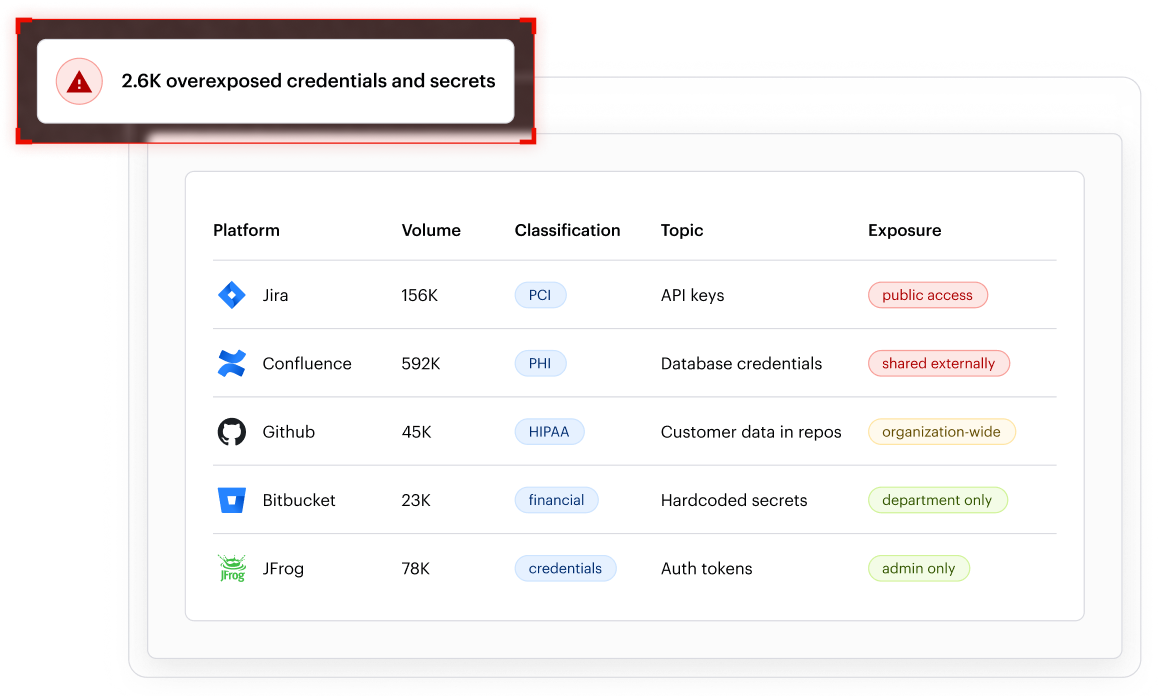
Varonis has extended its data security platform into the tools developers use to plan, build, package, and collaborate. New capabilities detect and secure secrets, credentials, and PII across the development lifecycle through integrations with Jira, Confluence, and GitHub, with new support for Bitbucket and JFrog.
With Varonis Atlas, customers can also secure the AI systems used to build AI applications and pentest applications before deployment.
Customers can now count files that are located directly under a selected folder. This makes it easier to generate precise reports for stakeholders by isolating top‑level folder contents.
Customers can now strengthen account security by detecting sign‑in attempts from malicious domains and validating password strength using new filters in Account analytics. The Token issuer and Password policies filters help teams quickly assess authentication risk and identify weak account protections.
Analytics for Resources and Groups now include dedicated views for governed entities, giving admins a single place to analyze governed resources and groups and take action. Enhanced filtering, insights, contextual drilldowns, and streamlined enforcement actions deliver greater visibility and actionability across the Data Access Governance (DAG) interface.
The new Requests page in Varonis Analytics provides a centralized workspace for viewing and managing all Data Access Governance (DAG) requests. Enhanced filtering, drilldowns, and built‑in insights help teams identify governance risks, enforce governance policies, and prepare for compliance audits more efficiently.
Labels can now be applied automatically to files that inherit flags from flagged folders, enabling fully automated labeling for new files added to flagged locations.
Multiple scan scopes are now supported for Google Cloud Storage and Azure Blob environments, allowing tailored scanning strategies within a single environment. Organizations can improve accuracy and efficiency by aligning scans to different data types and business needs.
Sensitive data in Azure managed databases can now be classified using side scans that avoid direct interaction with live systems. This reduces operational risk while supporting stronger security and compliance requirements in cloud environments.
AI‑powered data classification is now available across all supported regions, enabling consistent identification of sensitive data throughout cloud environments. This expansion helps organizations improve visibility and prioritize protection efforts at scale without regional limitations.
Customers can now use their own secrets from AWS KMS, Azure Key Vault, or Google Cloud KMS when integrating Databricks. This provides centralized control over the entire encryption lifecycle while preserving flexible integration options.
Customers can now use Varonis advanced classification capabilities to apply data classification labels to sensitive data in Salesforce using the new Apply Salesforce Data Classification Labels action. This allows organizations to automatically classify sensitive fields and leverage Salesforce built‑in controls—such as Data Masking, Field Encryption, Transaction Security Policies, and Agentforce guardrails—to restrict access and better protect sensitive information.
Export detailed audit logs that record who did what, when, and where across cloud environments. The audit log covers key administrative and security actions, supporting investigation, governance, and compliance workflows.
Varonis now provides full visibility into all tables in ServiceNow ITSM environments. Customers can now classify and monitor every table to ensure sensitive data is identified wherever it resides.
Apply data classification labels to sensitive Salesforce data.
Varonis Atlas is an end to end AI Security Platform that helps organizations see and control AI across the enterprise. Organizations can use Atlas to find AI risks, fix them proactively, and alert on dangerous behavior at runtime.
Atlas connects to any AI system organizations build or run, including hosted AI platforms, custom LLMs, chatbots, agentic frameworks, and embedded AI. From discovery and posture management to runtime protection and compliance, Atlas spans the full AI security lifecycle.
The Database Security dashboard gives security teams a unified view of database security posture. This dashboard consolidates visibility into sensitive data exposure, classification coverage, access behavior, and risk indicators—making it easier to identify high-risk databases and understand where sensitive data is most exposed. The dashboard supports Azure, Databricks, Snowflake, AWS, and on-premises databases.
This centralized view reduces investigation friction by removing the need to manually piece together insights from multiple pages, improving response efficiency and strengthening database security governance.
Customers can now schedule automatic weekly pauses and resume widows for account integrations, covering all API communication—including DCE scanning. This ensures Varonis operations run during approved timeframes and avoid disrupting production systems during peak hours
Varonis now provides full monitoring and protection for ServiceNow ITSM environments, enabling organizations to secure sensitive data stored in tickets, records, and attachments.
Coverage for ServiceNow includes record- and field-level classification, threat detection through login and CRUD activity monitoring, identification of publicly exposed tables and CSPM risk coverage. The integration also supports CMDB discovery, allowing organizations to extract configuration inventory for use in Varonis.
Customers can now investigate database activity and resources with greater clarity using enhanced filters and contextual columns across investigations and reports. New filters and columns make it easier to identify high-impact events, understand which databases and roles are involved, and assess the scope of data access. This visibility improves audit efficiency and supports compliance workflows by delivering consistent, granular context across activity level and resource level investigations.
Customers can now run AWS database side scans using their own KMS keys. This helps organizations maintain strict control over encryption and comply with internal security requirements, while still gaining comprehensive visibility into AWS hosted databases.
Varonis now supports database activity monitoring for MongoDB and MongoDB Atlas through the Gatekeeper Proxy with DNS multiplexing. This gives organizations visibility into activity across MongoDB environments, making it easier to investigate events, strengthen oversight, and close monitoring gaps across database infrastructures.
Control where each data classification policy runs by selecting specific services and accounts, ensuring policies only apply where they matter. This targeted approach improves efficiency by avoiding unnecessary processing, increases accuracy by reducing noise, and gives more precise control over policy scope. This update allows organizations to easily include or exclude accounts and quickly adjust scope using search and bulk selection.
Customers can now use their own encryption keys when integrating with Snowflake. Keys may be supplied from AWS KMS, Azure Key Vault, or Google Cloud KMS to encrypt and protect Snowflake related data using the chosen cloud provider’s native key management service. This allows customers to retain full control over key rotation, expiration, and revocation.
Cloud system health alerts now appear on the System Health page in the Varonis Web Interface, providing a centralized view of system‑level issues. This unified visibility helps customers better monitor platform health and more easily identify issues that may require attention.
Customers can now use a new Informational severity level for detections that don’t require action but are still useful for awareness. This helps reduce noise in the alert queue while keeping low‑risk activity visible for context and investigation.
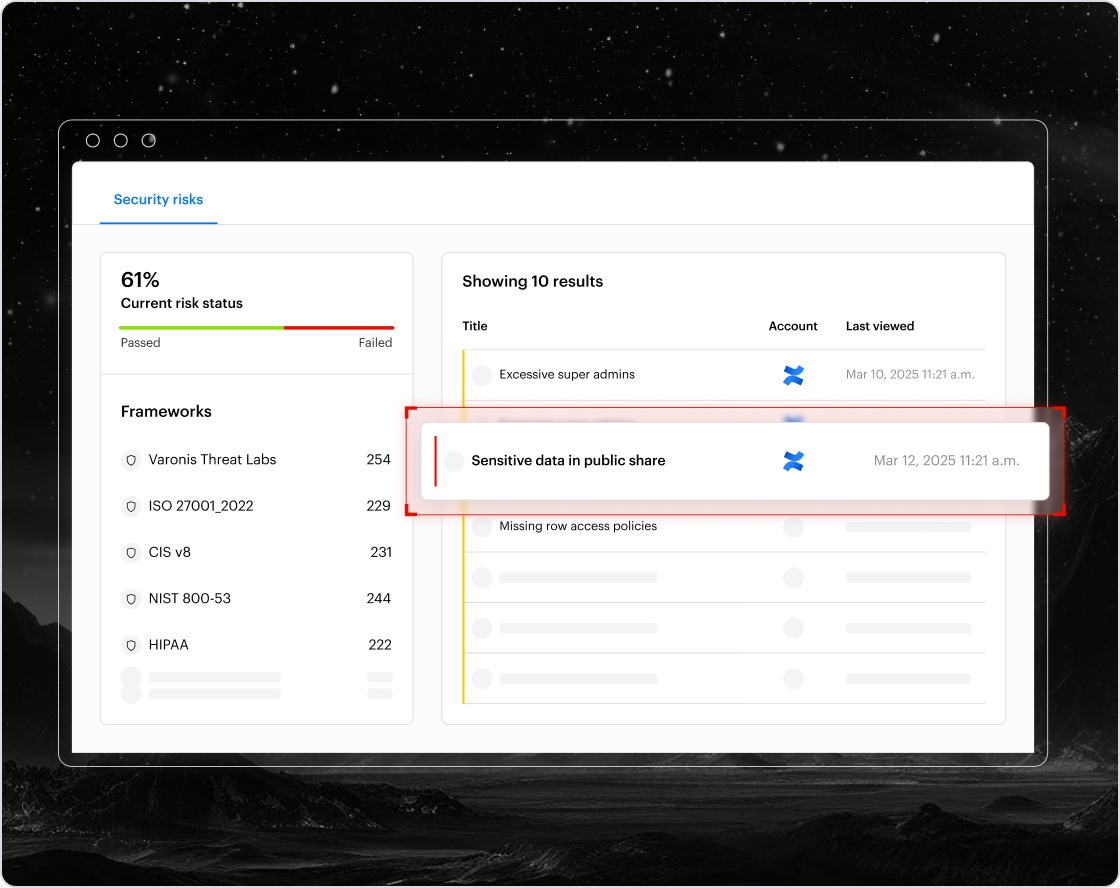
Customers can now apply Varonis data protection to Confluence environments to identify sensitive information and reduce the risk of data leakage. This helps prevent accidental exposure and malicious access to sensitive content such as product documentation, onboarding materials, and customer data—especially when shared with external collaborators.
Manually registering NFS shares is now easier. When a share name is missing, the system automatically searches by share path, helping you quickly locate and register the NFS shares you need.
Varonis now supports VAST Data as a data source, extending visibility and protection to modern storage environments. This integration enables Varonis to monitor VAST data activity, directory structures, permissions, and events, while also supporting data discovery, classification and labeling for files that reside in the monitored data sources.
Customers using REST API, Varonis can now integrate Netskope Secure Web Gateway. This allows web proxy events to be sent directly to Varonis for monitoring, providing more comprehensive visibility into user activity and strengthening security posture.
Customers can now simplify setup and reduce overhead by using one Entra ID application to monitor all Azure Files storage accounts. This eliminates the need to manage separate apps for each account, streamlining onboarding, and making administration easier—especially in large environments.
Customers can now strengthen account security by detecting sign‑in attempts from malicious domains and verifying adherence to strong password policies. In Account analytics, the new Token issuer and Password policies filters make it easy to assess risk:
Varonis can now classify ChatGPT conversation text based on active data classification policies. This feature fully supports your custom classification settings, providing complete and accurate visibility into sensitive content generated in ChatGPT.
Customers can now set up automated actions when a threat detection policy triggers an alert. Supported responses include quarantining endpoints via EDR (Microsoft Defender, SentinelOne, CrowdStrike) and disabling users, with exclusions to prevent operational disruptions.
Customers can now use the Data Access Governance (DAG) authorization rules API to retrieve the full configuration of authorization rules on governed resources and groups. This gives administrators and governance teams complete visibility into approval policies, including rule structure and approval levels, assigned authorizers and their roles, domains, and rule activation status. With this insight, customers can better detect, validate, and troubleshoot approval chains, ensure governance policies are enforced, and simplify auditing and ongoing rule maintenance across file shares or other governed assets at scale.
Organizations who already know which resources and groups require governance can now bulk upload governance metadata for resources (Windows/SPO) and groups using a dedicated BulkOps UI. Previously, maintaining these known entities required manual effort or custom API scripts. With BulkOps, customers can now streamline this work and deploy governance policies faster across large environments.
Varonis now enables customers to replace deleted files in Data Lifecycle Automation workflows with a generated text file (stub) that contains key details about the original file, such as its name, source folder, and destination folder. This ensures critical context remains accessible even after data is moved. Stub files are automatically excluded from copy or move operations. Unlike link-based replacements, stub files do not rely on network connectivity or destination system availability, making it easier to track and audit file movements.
Customers can now customize the list of global access groups (GAGs). Add or remove CIFS Active Directory groups to control which ones are remediated by the org‑wide exposure automation. This provides flexibility to include custom groups or exclude groups that shouldn’t be remediated, helping you align automated remediation with the organization’s data structure.
It is now possible to classify sensitive data inside Jupyter Notebook (IPYNB) files, providing better visibility into high‑risk content such as credentials, secrets, and code. With this added coverage, users can more easily identify sensitive information hidden in notebooks and reduce risk of exposure.
Customers can now automatically apply classification labels to files based on Varonis flags. This provides more control and precision by letting users use file flags as an additional filter within label conditions—not as standalone criteria. Labels are applied or removed automatically as flags change, ensuring classification results stay accurate and aligned with configured rules.
Customers can now classify JSON Lines (JSONL) and Newline‑Delimited JSON (NDJSON) files, which are commonly used to train and fine‑tune large language models. This helps organizations identify and protect sensitive data in AI training sets while extending Varonis classification coverage to additional file types.
Sensitive items containing PII is now fully covered by the Sensitive items widget, giving customers a single, consistent view of their sensitive data and reducing duplication across dashboards.
Exposure tags are now displayed in a dedicated exposure column, making it easier to identify, filter, and work with exposure insights. Exposure tags such as public, private, and org-wide have been moved into the dedicated exposure column. All reports, widgets, automation settings, and threat detection policies that previously relied on exposure tags have been automatically updated.
Customers can now change the integration user when configuring their Google Cloud account, giving organizations more control and keeping the integration aligned with their environment. From Configuration > Connected Services, open the Google integration and select Change Integration User to update the account.
Customers now have more control over how MIP labels are applied in Varonis. These enhancements provide control over how automated labeling policies interact with existing labels, including manual labels and priority-based overrides. Within their Labeling Settings, customers can now choose to always apply Varonis labels and override existing ones, apply labels based on priority so higher‑priority labels win, or preserve manual labels by ignoring conflicting automated labels. This added flexibility helps enforce consistent labeling while respecting intentional, user‑applied classifications.
Item Analysis now displays the Data Locale value for every row in an analyzed table. This added visibility shows exactly which locale contributed to each classification insight, helping customers validate the results directly against the underlying data. By clearly connecting classification insights to the underlying raw data, Varonis makes it easier to confirm accuracy, support audits, and build trust throughout the investigation and validation process.
Speed up investigations by saving your custom activity searches, including filters, logic, and column layouts, directly from the Investigation Activities page. Use these saved searches to apply the same queries anytime, ensuring consistent views and eliminating repetitive setup.
You can now investigate activity by a unified identity filter called Entity, which represents a user by all their associated accounts across all supported platforms. This makes it easier to investigate suspicious activity across all a user’s accounts at once, gives insight to how accounts are linked and why, and allows advanced filtering by attributes like department, manager, or title. Currently supports Active Directory (AD) and Entra ID, with more platforms coming soon.
Varonis now supports access‑denied event notifications from NetApp ONTAP Cluster Mode via FPolicy—including NTFS permission failures introduced in ONTAP 9.13.1. These events are critical for detecting attacks and are widely used in threat detection policies, as they help surface suspicious or malicious activity earlier. For details, see Supported Events for NetApp Data Sources.
You can now filter and analyze SMB (CIFS) and NFS file‑access events in Varonis using application protocol‑type metadata—just like with firewall and proxy events. Protocol filtering gives you clearer visibility into file activity and helps you quickly distinguish between protocols. This lets you drill into SMB/NFS events and respond more precisely to access patterns.
The Varonis Web Interface now supports Informational alert severity and highlights activity that may be associated with attack scenarios but often occurs during normal, legitimate user behavior. These alerts help teams reduce noise, focus on what matters, and triage threats more efficiently. They typically do not require immediate action, helping you avoid distraction from low‑priority signals.
Threat Detection policies now alert on abnormal behavior in SharePoint Online data sources, expanding coverage beyond OneDrive. This feature helps you spot unusual patterns involving sensitive file interactions with ChatGPT.
You can now view Data Access Governance (DAG) reports directly within the DAG UI—no export required. Simply navigate to Reports, select the report you want, adjust your filters, and click Run to see results instantly. You can view up to 50,000 results directly in the UI. To see additional results, you’ll need to export the report.
Detect and act on unused access with new staleness indicators in the DAG API. When a user hasn’t used a group membership or permission past your configured staleness threshold, it’s flagged as stale and recommended for removal. Use the new fields — isStale (Boolean) and staleSinceTimestamp (DateTime) — to quickly pinpoint dormant access, clean up unnecessary privileges, and reduce security risk.