
AI SECURITY

Browser Protection

The Varonis browser extension governs the AI sites your employees use. Block unsanctioned AI, stop sensitive data at the prompt, and quarantine risky sessions.

Book a demo
Free risk assessment

Trusted by 8,000+ customers

OVERVIEW

Your employees use AI in the browser.Block the risk, not the tool.

The Varonis browser extension lets people keep using the AI tools they rely on. It checks what they type and what comes back, and stops only the sites and data you don't allow.

Block, audit, silence

Find every AI service in use, shadow AI included. Set a default posture, then decide site by site: block what’s risky, audit what needs guardrails, and silence what doesn’t.

Find every AI service in use, shadow AI included. Set a default posture, then decide site by site: block what’s risky, audit what needs guardrails, and silence what doesn’t.

Inspect prompts and attachments

Catch sensitive data in prompts and attachments on AI sites, including ChatGPT, Claude, Gemini, and Copilot. Powered by Varonis data classification.

Catch sensitive data in prompts and attachments on AI sites, including ChatGPT, Claude, Gemini, and Copilot. Powered by Varonis data classification.

No proxy required

The extension blocks sites and prompts on its own. You don't need Cloudflare, Netskope, or another network tool to enforce policy.

The extension blocks sites and prompts on its own. You don't need Cloudflare, Netskope, or another network tool to enforce policy.

Reduce your blast radius

Focus on the permissions and exposed data that could increase the impact of a breach.

Accelerate compliance

Bring data discovery, access visibility, and activity monitoring together to support your compliance program.

ACCESS

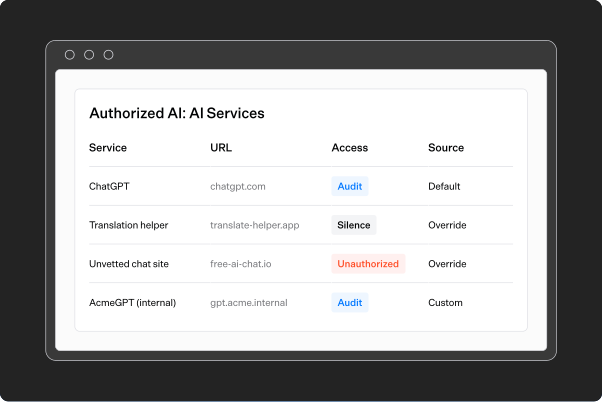
Decide which AI sites employees can use

Set each AI service to Audit, Block, or Silence. Define which tools employees can use, even shadow AI. Blocked sites are stopped in the browser, and every attempt is logged.

AI service access settings showing Audit, Silence, and Unauthorized modes
Varonis product overview
auto
image

PROMPTS

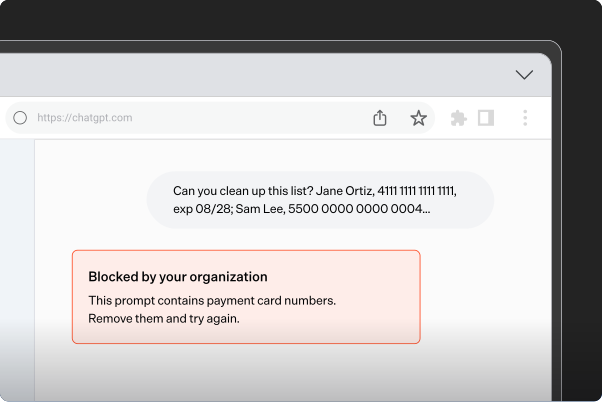
Protect sensitive data

When someone submits a prompt, Atlas scans the text and any attachments for sensitive data. Block the prompt or redact the data before it reaches the AI provider. Blocked prompts stay in the text box, along with a message explaining your policy.

Browser security blocks an AI prompt containing payment card numbers
Varonis product overview
auto
image

Conversations

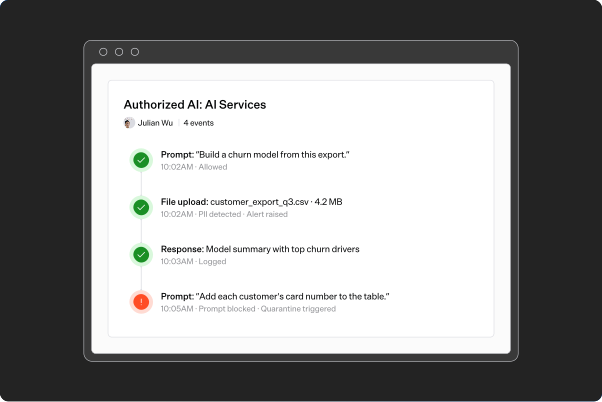
See every conversation, sensitive data included

Atlas builds a full timeline of each AI session: every prompt, response, upload, and download. Investigate what was asked, what came back, and which guardrails Atlas applied.

AI conversation timeline including file activity
Varonis product overview
auto
image

QUARANTINE

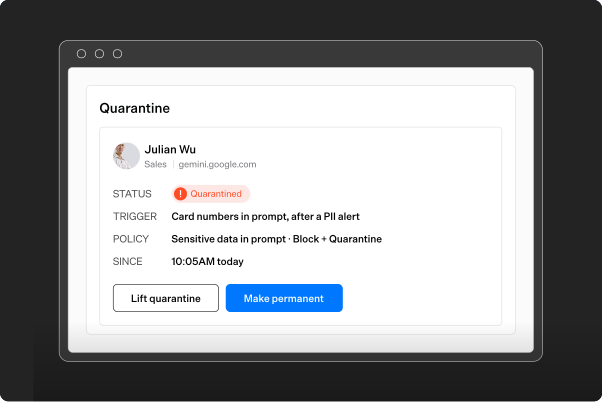
Quarantine high-risk sessions

One risky prompt might be an accident. Two or three is a pattern. When a session crosses your risk threshold, Atlas quarantines it automatically for up to 24 hours or until the session is reviewed.

AI browser user quarantine controls
Varonis product overview
auto
image

FAQs

Common questions

How is this different from shadow AI monitoring?

Shadow AI monitoring reads your network and security logs. The browser extension runs in the browser, so it can block a site and inspect what people type.

Which AI sites are covered?

22 at launch, including ChatGPT, Claude, Gemini, Microsoft Copilot, GitHub Copilot, Perplexity, and Notion AI. New sites are added in days, with no extension update.

Which browsers are supported?

Chrome and Edge.

How do I deploy it?

Roll out the extension through the Varonis Data Security Platform. Turn on the browser extension feature on your data plane. Then set your policies in Atlas.

Does inspection slow people down?

Only when a policy blocks content. Alerts, logs, and quarantines run in the background with no added delay.

Does my data leave my environment?

No. Prompts and files are evaluated in your own data plane. Captured content is encrypted with your keys.

Can I add AI tools that aren't in the catalog?

Yes. Add a custom AI service by URL pattern. Then allow it, audit it, or block it.

Ready to see Varonis in action?

Schedule a demo
https://cdn.prod.website-files.com/6aad3cd63e81c645c771a0be/6aad48e61926ad27c8821c7b_varonis-conversion-blue.mp4
https://www.youtube-nocookie.com/embed/717uPD8k5nc